A misconfigured Apple TV can result in a device with no sound. By default, most of the Audio & Video settings are set to Auto and for the majority of users this works fine. However, some of the auto setting can be the source of the no audio problem. The first method I try for any Apple TV issue is to reset the device (Hold the Play & Menu button simultaneously on the remote for 6 seconds). Sometimes a reset will do the trick. Continue reading for the most common fixes of the no audio issue for the Apple TV:
Apple TV No Audio Fix
Go to Settings > Audio & Video
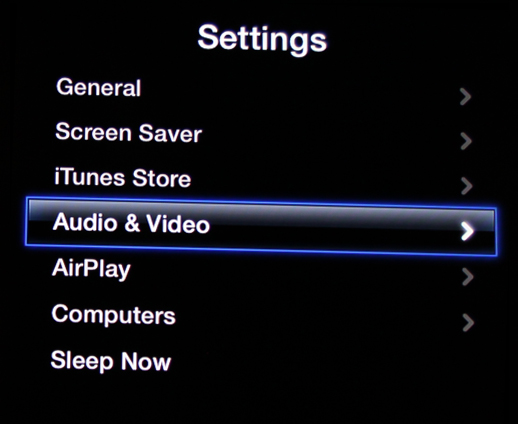
In the Audio & Video setting, turn off ‘Dolby Digital’

Test the audio. Continue reading if the problem still persists.
Common Apple TV No Audio Fix
Go to Settings > Audio & Video > TV Resolution and change the resolution to ‘1080p HD – 50Hz’
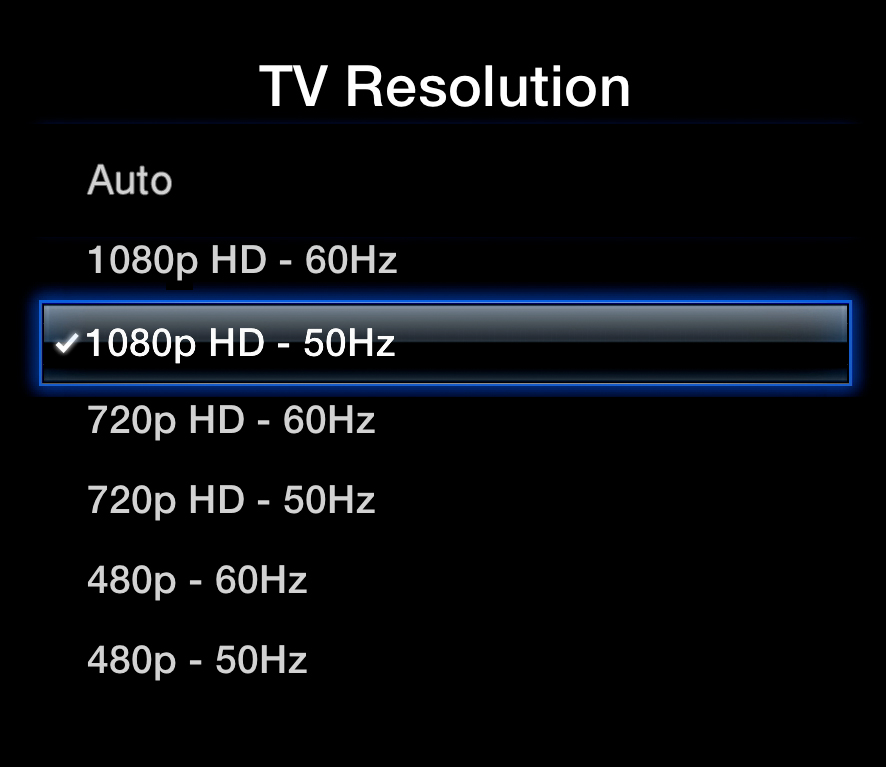
Test the audio. Continue reading if the problem still persists.
Common Apple TV No Audio Fix
Go to Settings > Audio & Video > Audio Output and change the output to ’16 bit’

Test the audio.
Reset Audio Driver for Macs
1. On your Mac, open the Launchpad, go to ‘Other’, and open ‘Terminal’
2. Enter the following line in Terminal:
sudo kill `ps -ax | grep ‘coreaudiod’ | grep ‘sbin’ |awk ‘{print $1}’`
3. This will reset the audio driver and should resolve the no sound issue

Couldn’t get the above to work on Mavericks, so I did my own version of it, and it works perfect!!
sudo kill `ps -ax | perl -ne ‘print if /sbin\/coreaudiod/’ | perl -ne ‘print $1 if /(\d+)/’`
after many fixes I went to the modem and checked and reset it to allow apple tv, this fixed the no sound problem .
Start by making sure your cables are connected. For some reason my cable was broken, (optical).
Thank you holding the two buttons down together did get it to restart and sound is back. I have the 2015 version.
Thank you for the trouble shoot. I just held the menu and play button down for 6 seconds, the light on the apple tv blinked a few times and the system rebooted. From there, back in business.
That works perfectly for me. Thanks
The reset worked perfectly. Many thanks.
I just selected TV via IR in settings -> remote devices -> select volume control and it works.
Thank you!!
Reset worked! Thank you!
Nothing of the above worked – so I took the “long way” and reset to factory setting + update and now I have sound playing in the background while reinstalling all my apps 🙁
None of these worked for me. this sucks.
None of this worked for me. Not happy.
None of these options have worked. Any other suggestions?
I turned double digital off an it worked!!
Reboot did not work. The sound is off about 3 minutes and then comes on. Any ideas?
I have sound except for when I play a video or any of the apps. You can hear the remote clicks, voice over, but still not actual sound in the movies etc. I’ve reset and changed all of the settings regarding sound and just about anything else. Nothing works. Thoughts?
I have no sound on my Directv Now app. All others have sound. I have picture and captions but no sound already did the reset
The is may trick the adversary into acquiring incorrect choices and giving you a bonus at the conclusion of the afternoon.
None of these fixes worked for me. I also replaced the HDMI cable. Any other fixes?
I have the same problem. Aside from doing factory reset nothing here worked so I inquired about what was last played. The kids were monkeying with the airplay mode and with some checking it actually plays the sound through the other Apple box.
Unlikely culprit but I thought I would share my experience.
Did the above. Now Apple remote won’t work
I tried all that also and my sound comes and goes so I am going to try a new HDMI cable . My Apple TV is only 3 years old so hope that works.
With Disney+ and Amazon I have background sound like cars and other loud noises but indistinct voice.
I could try step 1 – I was not able to find dolby or any other steps in recommendations above
I unplugged from the mains which is probably similar to the holding down two buttons reboot. Worked a treat
The reset worked Thanks
Dolby off..
Sound on!
I know this is an old link but perhaps someone can help me.
I’m trying to connect my iPhone 6 and mirroring to my old apple tv.
I have tried all the above suggestions and have also reset the apple tv. Only getting video even while trying to connect via my tv’s blue tooth. I use my hdml 1 for the tv and html 3 for the apple tv. All OK except that the tv is still playing audio from hdml. I am not using an optical audio cable connected from the TV to the apple TV. Perhaps this would simply solve the problem. This didn’t used to be a problem in the past. Any help would be appreciated. I’ve also watch several youtube video’s but the problem persists. Of course I could just watch pro squash on my desktop mac, but I wanted to use the bigger screen on the tv which is why I bought an apple tv in the first place.
Any assistance would be appreciated.
Thank you!
Our power went out for a few minute in afternoon. When we went to turn on Apple TV it was already on but no sound when we tried to play program. Tried reset with remote. Unplugged one cord from Apple TV. We don’t have Audio Z
Output. Any suggestions??
Thank you! Really helped and fixed it
I find restart Apple TV works for a while, then the same thing all over again.